

Jorgina A. Ross, Kansas Geological Survey
The first problem shown here is the consequence of difficulty in locating and correctly identifying observation wells in the field. The second problem results from traditional methods of data management: A relational database and the annual publication of new data provided the normal tabulation and distribution of water level. When maps were produced to present information derived from the data, they were normally done as a part of the annual publication, not easily accessed by the public.
About 1380 wells are scheduled for annual measurement in January of each year. This year, a crew of six people from the Kansas Geological Survey measured water levels in those wells. Each crew member was deployed with acquisition software running on a notebook PC interfaced to a GPS unit, along with field notes, maps, a cellular phone and other supplies. The data acquisition software system, WaterWitch, was developed at the Kansas Geological Survey.

Figure 1--View of WaterWitch navigation screen as field crew follows route.
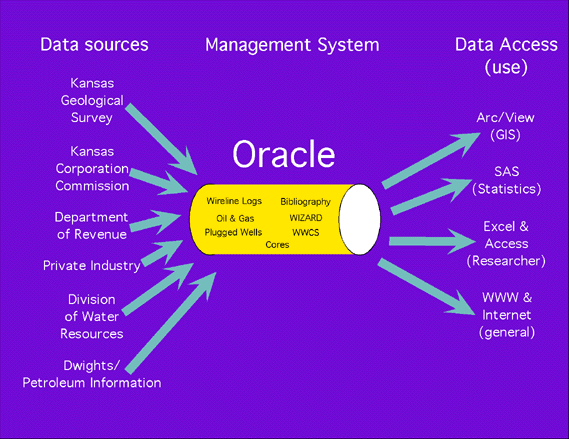
Figure 2--The objective of WIZARD is to merge water well data from databases maintained by many organizations and distribute the data to users in several ways.
Data Access
Internet queries through Wizard water well search form:
http://www.kgs.ku.edu/Magellan/WaterLevels/index.html
At present, listings of water level measurements and well construction data can be obtained via the Web. Using this mechanism, data is provided as a listing without visualization of the spatial context of the data.
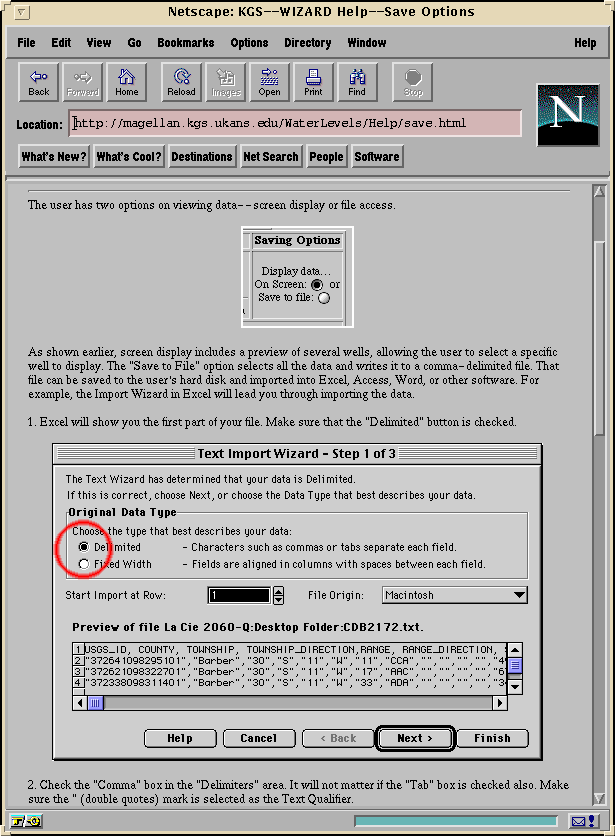
Figure 3--This method of data access requires only a Web browser at the user's end, connecting via the Internet to the data provider's Web server.
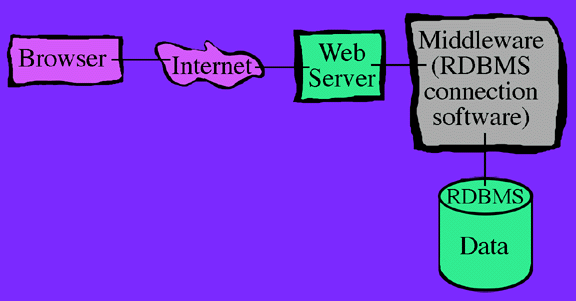
Figure 4--The Web server connects, through middleware, to the relational database management system (RDBMS). The middleware establishes the communications protocols between application programs and the appropriate databases. With these connections, delimited text files of selected data can be downloaded directly from ORACLE, for import to the user's own GIS or relational database system. In this case, where no attempt is made to visualize spatial relationships, the Oracle Application Server provides an effective database connection, taking maximum advantage of application libraries bundled with ORACLE.
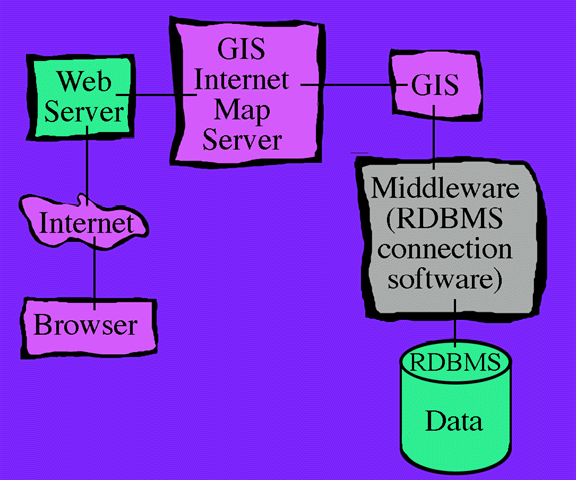
Figure 5--The Web services just described for access to raw data can be enhanced by the addition of geographic information systems technology. A Geographic Information System is inserted as an intermediate step between the provider's Web server and the RDBMS connection software.

Figure 6--The complexity of serving a multitude of spatial features to the Web as map images requires the addition of one more component to the system, a GIS map server. An extension of ArcView, marketed as IMS, was used as the map server for the water well project. Map servers establish the communication protocols between the provider's Web server and the GIS. Most importantly, they provide efficient facilities for browsing, viewing, and querying maps.
In addition to the functions just mentioned, the IMS can serve as a network administrator to handle multiple GIS sessions on multiple work stations.

Figure 7--Once a GIS project has been served to the Web, a user may access the project via the Internet from any platform (UNIX, PC, or Macintosh). Users do not need to be running any GIS product at their end in order to browse, view and query the served GIS project. This meets a critical objective of the Kansas Geological Survey and the Division of Water Resources for systems designed to provide access to public information. The end result should be robust, while placing minimal requirements on the user for hardware or software. As presented here, users need no more than the bare minimum of capabilities currently provided on any personal computer sold with Internet access capability. The pilot project presented here is served at: As of June 4, 1999, link temporarily unavailable as project is moved to new server. . A Java-capable browser is required to view this pilot project.

Figure 8--Via the Internet, the user may view tables in real time, obtaining data on all or selected subsets of wells. More importantly, data may be viewed in the spatial context of selected map features.

Figure 9--This example shows water levels in each well charted over several years.
If you would like to encourage development of GIS capabilities by the general user, one convenient way is ArcExplorer.
Geologic Information Systems
The enhancement of spatial data through visualization of water data in GIS applications, combined with the power of communication links to the Internet tested in this project, can be directly applied to geologic data in general. In both the US and abroad, agencies with extensive GIS experience have been impressed by Internet demonstrations of the information content and communication value of the Kansas Geological Survey's water well data management project. The Austrian government, for instance, plans to work with the Kansas Geological Survey to develop the same kind of system for their geochemical data.
The system design presented here for communication of GIS applications via the Internet is a practical reality. The broad base of potential users makes this a cost effective method for communicating the results of geologic research and data collection.